How to Use the Facebook Ad Library to Research Competitors
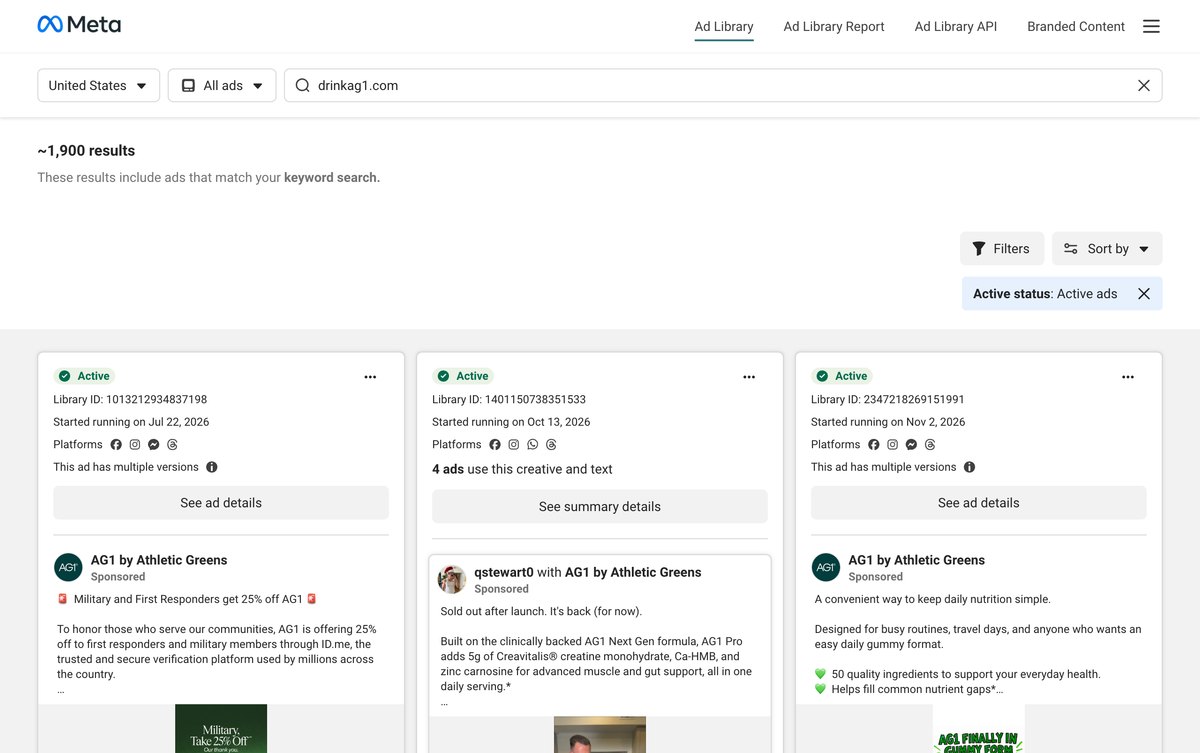
The Facebook Ad Library (now called the Meta Ad Library) is Meta's free, public database of the ads running on Facebook, Instagram, Messenger, Threads and Meta's other apps. Anyone can search it, with no account and no login, at facebook.com/ads/library.
Most guides stop at "type a brand name and scroll". That shows you ads. It doesn't tell you which ones are working, or what happens after someone clicks. This guide covers how we actually use the Ad Library for competitor and creative research: which search to run, how to spot the ads a brand is putting money behind, and how to find the landing pages behind them.
Last updated November 27, 2026.
Key takeaways
The Ad Library shows every active ad on Facebook, Instagram and Meta's other apps. It's free and needs no login.
Search the brand's website address, not just its name. It also finds creator and partnership ads that point to the brand.
Sort by impressions, high to low, to see which ads Meta is delivering most.
An ad that has been running for months, in several versions, is one the brand keeps paying for. That's the closest public signal of a winner.
Click through to the landing page. The page behind the ad often tells you more than the ad does.
It won't show spend, results or targeting for normal commercial ads. Political and issue ads are the exception.
What the Facebook Ad Library shows
Every active ad, from every advertiser, in every country Meta serves. For each ad you can see:
The creative and copy, including each version when an ad has several.
When it started running.
Which platforms it runs on: Facebook, Instagram, Messenger, Threads or WhatsApp.
How many ads use the same creative and text.
The button and the page it links to.
For ads about social issues, elections or politics, it shows more: who paid for the ad, a range for how much they spent, the reach by demographic, and inactive ads too. Meta keeps those for seven years.
Ads delivered in the EU and UK can also show extra transparency details, because of local rules. For everyday commercial ads in the US, you get the ad, its dates and its platforms, not the spend or results.
How to search the Ad Library
Go to facebook.com/ads/library.
Choose the country. Pick the market you sell in, or "All" to see everything.
Choose the ad category. "All ads" covers everyday commercial ads; the other options cover ads about issues, elections or politics, and housing.
Type into the search box. You can search by advertiser (the Facebook Page name) or by keyword.
Use the filters and "Sort by" to narrow what you see, then open "See ad details" on any ad.
How we use it for competitor research
This is the process we use when we research a category before building new ads or a new landing page. We used it to find the pages behind live ads for our landing page examples.
1. Search the website address, not just the brand name.
Searching a domain like drinkag1.com as a keyword brings back AG1's own ads, but also the creator and partnership ads that link to AG1, the ones that show "[creator] with AG1 by Athletic Greens". Searching the Page name alone can miss those, and partnership ads are often where a brand is testing new angles.
2. Sort by impressions, high to low.
"Sort by" offers "Impressions: high to low" and "Most recent". Impressions shows you which of the brand's ads Meta has delivered most. Brands rarely keep high delivery on an ad that isn't paying for itself, so the top of that list is a good place to start.
3. Read the start date.
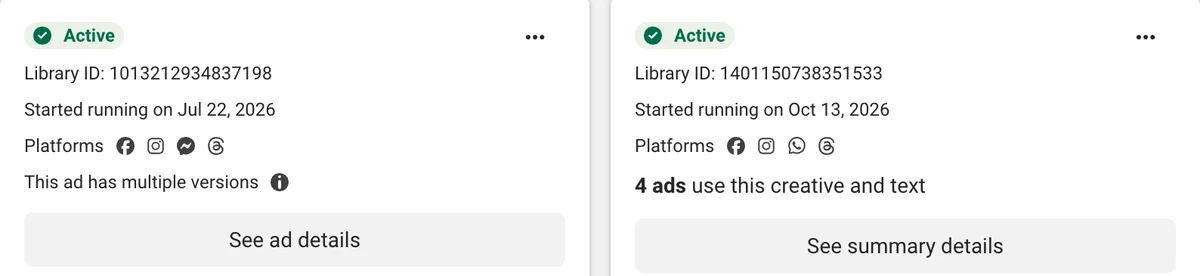
Each ad shows "Started running on". A brand that tests constantly turns off losing ads within days or weeks. An ad that's been running for three or six months is one they keep paying for. That's not proof it's profitable, but it's the closest signal you'll get from outside the account.
4. Look for versions and duplicates.
"This ad has multiple versions" means one ad is being tested with different images, headlines or text. "4 ads use this creative and text" means the same creative is running in several places, often several ad sets or campaigns. Both are signs of a concept the brand is putting weight behind.
5. Click through to the landing page.
Open the ad and follow its button. Big brands often send ad traffic to pages you'd never find from their menu: AG1 runs offer pages on its own /lander/ paths, and Huel runs a separate try.huel.com page written for GLP-1 users. The page behind the ad tells you the offer, the audience and the objections they're answering, which the ad alone often doesn't.
6. Write it down.
Keep a simple swipe file. For each ad worth keeping, note the brand, the date you saw it, how long it's been running, the format (static, video, creator), the hook, the offer, the angle, and the landing page. After a few weeks of this, patterns show up: which angles keep getting renewed and which disappear.
What the Ad Library won't tell you
Spend and results. For commercial ads outside the special categories, you won't see budgets, sales, clicks or ROAS. Political and issue ads are the exception.
Targeting. You can't see who an ad is aimed at in most countries.
Old ads. Most commercial ads disappear from the library once they stop running. Save what you want to keep.
Whether it works. A long-running ad could still be losing money. Use the library for ideas and hypotheses, then test them in your own account.
So treat it as research, not a shortcut. Copying a competitor's ad rarely works, because the ad was built for their offer, their price and their customers. Borrow the idea, the format or the angle, and make it your own.
Using what you find
Map the angles. Group a competitor's long-running ads by the reason to buy they lead with: price, results, ingredients, a founder story, social proof. Gaps in that map are angles you can own.
Match formats to placements. Note which run as Reels and Stories versus feed images, and plan your own mix.
Study the pages, not just the ads. If several competitors send traffic to dedicated offer pages, test one yourself. Our landing page examples show eleven of these pages, marked up section by section.
Feed your testing plan. Turn the best ideas into concepts and variants, and test them properly. Our Meta ads creative testing framework covers how.
Frequently asked questions
Is the Facebook Ad Library free?
Yes. Anyone can search it at facebook.com/ads/library, and you don't need a Facebook account or a login. Meta also offers an Ad Library API for researchers and developers.
Does the Facebook Ad Library show all ads?
It shows all active ads running across Meta's apps. Inactive commercial ads usually drop out once they stop running. Ads about social issues, elections or politics stay in the library, active or not, for seven years.
Can you see how much a competitor spends on Facebook ads?
Not for normal commercial ads. The Ad Library shows spend ranges only for ads about social issues, elections or politics. For other ads, the best public signals are how long an ad has been running, how many versions it has, and where it ranks when you sort by impressions.
Does the Ad Library include Instagram ads?
Yes. It's the same library for Facebook, Instagram, Messenger, Threads and Meta's other apps. Each ad shows the platforms it runs on.
How do I see all the ads a Facebook Page is running?
Search the Page name in the Ad Library and pick it from the suggestions, or open the Page on Facebook and look for its Page transparency section, which links to its ads. To also catch creator and partnership ads for the brand, search its website address as a keyword.
How can I tell if a competitor's ad is working?
You can't know for sure from outside the account. The strongest signals are an ad that has been running for months, several versions of the same concept, the same creative used in several ads, and a high position when you sort by impressions. Treat those as ideas to test, not proof.
To wrap things up
The Ad Library is the best free creative research tool there is, if you use it for more than scrolling. Search the domain, sort by impressions, read the start dates, count the versions, and follow every good ad through to its landing page. Then turn what you find into tests of your own.
If you'd like a team to turn that research into ads and run them, see how we work as a Meta ads agency and on performance creative.
Featured Articles
Our most popular and impactful content

The First Spark newsletter
Written for founders and marketing leads at D2C, CPG and SaaS brands. Unsubscribe any time.