Google Ads for B2B SaaS: How to Structure, Bid and Scale
Google Ads for B2B SaaS works differently from ecommerce. The buyer doesn't check out. They book a demo, sit in your CRM for weeks, and either turn into pipeline or don't. So the account has to be built to find the people who become pipeline, not the people who fill out forms.
This guide covers how we structure, bid and scale Google Ads for B2B SaaS and other B2B companies, with two real accounts we manage as examples: Oscilar, a B2B SaaS platform for credit underwriting, fraud and transaction monitoring, and Talentfoot, a B2B recruiting firm.
Last updated November 21, 2026.
We're not covering the basics here: location settings, excluding display from Search campaigns, turning off auto-apply suggestions, keyword research, ad copy or landing pages. Those matter. This is about the structure that lets an account scale once they're in place:
How to structure the campaigns.
Offline conversion tracking.
Bidding strategy.
Negative keyword lists.
Broad match.
Going past Search: Display, Demand Gen, Performance Max and YouTube.
Then the two case studies, what a good B2B Google Ads proposal should include, and the questions we get asked most.
1. How to structure Google Ads campaigns for B2B SaaS
If you talk to anyone who knows Google Ads, they'll talk about account simplification.
It sounds backwards when you're trying to scale. The instinct is to add campaigns so you can control budgets, or split keywords into tighter groups. That's not the way.
Google is a data-first platform. Its automated bidding (Maximize Conversions, Target CPA, Target ROAS) learns from the conversions each campaign generates. Fewer campaigns means more data per campaign, which means the bidding finds results faster.
For most B2B SaaS accounts, that means four kinds of campaigns and not much else:
Brand. Your company and product names. Cheap, high intent, and worth protecting.
Non-brand, split by product or use case. One campaign per thing a buyer actually searches for. Oscilar runs separate campaigns for credit decisioning, transaction monitoring and fraud, because those are different buyers with different budgets.
Competitor. People searching for the tools you replace. In B2B SaaS these are often the highest-value campaigns in the account (more on that in the Oscilar case study below).
Remarketing, once you have enough site traffic to segment (see section 6).

Note: If you're consolidating an existing account, the platform needs time to adjust. Allow at least three weeks, and do it in stages if you can so results don't drop all at once.
To consolidate, start by mapping every campaign, ad group and keyword in a spreadsheet. Here's the sheet we use for that mapping with clients. Feel free to copy it here.
2. Offline conversion tracking
Offline conversion tracking is as critical for B2B as the keywords you target and the structure you've built. It's also the thing we find missing most often, mostly because it takes some technical work to set up.
Offline conversions are changes in your CRM (HubSpot or Salesforce) that get sent back to Google Ads. They tell Google which leads turned out to be good.
In HubSpot, the Lifecycle Stage field does this job. It usually runs Lead, then Marketing Qualified Lead, Sales Qualified Lead, Opportunity and Customer. Set up a conversion for each stage that matters to you (we usually use MQL, SQL and Opportunity), so when sales updates a lead, Google Ads sees it.
Now instead of finding more people who fill out a demo form, Google can find more people who become SQLs and opportunities. More spend gives Google more data, which brings in more qualified leads. That's the flywheel you want before you scale.
Two things we've learned the hard way:
Use a conversion you control. HubSpot's built-in MQL stage changes whenever someone's lifecycle stage is updated, by any rule or any person. Oscilar's team moved bidding to a custom qualification event they define, so the signal Google learns from means the same thing every week.
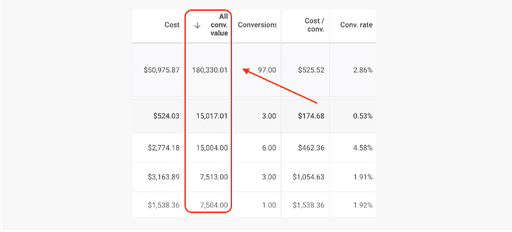
Add values. Give each stage a value (an opportunity is worth more than a lead). Even if you never bid on value, it lets you judge campaigns and keywords on pipeline instead of lead counts.
If you're on HubSpot without Marketing Hub Pro, the native ads integration isn't available, so you'll need a tool like Zapier to send the same events back. It's a few extra steps and worth it.
3. Which bidding strategy works best for SaaS
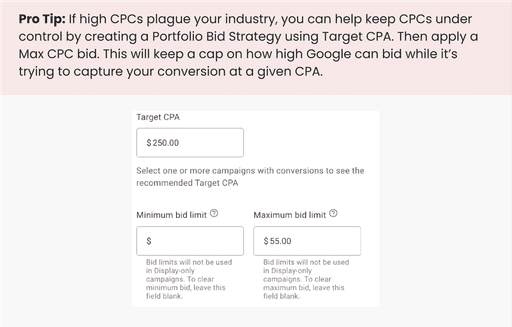
Scaling without the right bid strategy means overpaying for results and underusing the data Google has.
This is the path we use to start and scale campaigns:
Manual CPC, then Maximize Conversions, then Target CPA (or Target ROAS if you track values).
Manual CPC controls bids at the start while the campaign builds conversion data.
Maximize Conversions takes over once a campaign is getting around 15 conversions a month.
Target CPA then controls what you pay for each conversion once the flow is steady.
We mostly stay away from Maximize Clicks and Target Impression Share for B2B lead generation.
Note: Maximize Conversions can pay high CPCs when it thinks a click is close to converting. That's usually fine, and it's the step before Target CPA.
The bigger question for SaaS isn't which strategy. It's which conversion you point it at. Bid on the event closest to revenue that still happens often enough for Google to learn from, usually SQL or opportunity, or MQL if you don't have the volume yet. The Oscilar case study below shows what happens when an account chases lead volume instead.
4. Negative keyword list organization
This sounds like a given, but plenty of high-spend accounts we audit don't have their negatives organized.
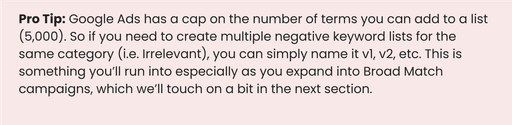
As you scale, negatives added one at a time at the campaign or ad group level become a problem. Every new campaign starts without what the others already learned. Shared lists fix that.
Here's the simple setup we use:
Low intent (brand). Brand-adjacent searches that trigger your brand campaign but never convert. Apply to the brand campaign.
Irrelevant. Off-topic and low-intent searches. Apply to every non-brand and competitor campaign.
Competitor keywords. Competitor names that leak into non-competitor campaigns. Apply to brand and non-brand campaigns.
Branded keywords. Your own brand terms. Apply to non-brand and competitor campaigns.
As spend goes up, review search terms more often and add each one to the right list.
5. Broad match
If alarm bells went off when you read that, you're in good company. For a long time broad match was bad. Really bad.
Today's broad match works differently. It uses signals beyond the keyword itself (the landing page, other keywords in the ad group, the searcher's recent searches) to match on intent. Paired with smart bidding, it can find searches you'd never think to add.
It's still broad, though. Before you turn it on, we'd want:
15 to 20+ conversions a month. Broad match needs steady data. 30 a month is safer.
An automated bidding strategy, ideally Target CPA, so it doesn't run off with the budget.
Bidding on down-funnel conversions. SQL or opportunity if you have the volume, MQL if you don't.
Active negative keyword management. It will show for irrelevant searches. Review and exclude them every week at first.
A Google Ads experiment first. Test broad match against your current campaign for at least three weeks, and judge it on SQLs and opportunities, not just demo requests.
Talentfoot is the clearest example we have of broad match working in B2B. More on that below.

6. Scaling beyond Search
These campaign types come after sections 1 to 5 are in place. Each has a role, but none of them fixes a Search account that isn't working.
Display ads
Think of Display as always-on remarketing that keeps you in front of people after they've visited. When was the last time you clicked a display ad, though? We only recommend it once you have enough traffic to segment. Use 30, 60 and 90-day windows, built from your key pages (pricing, demo, solutions, comparison pages).
If brand matters to you, upload static ads. Responsive display ads can create combinations your CEO won't like.
Demand Gen ads
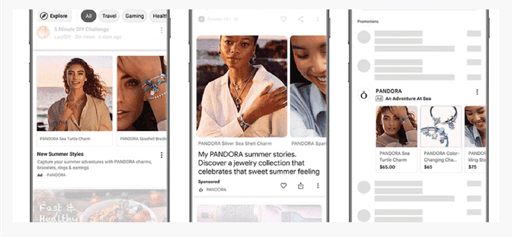
Demand Gen campaigns run on YouTube (including Shorts), Discover and Gmail.
We use them for remarketing more than prospecting, because in our testing those placements beat Display. If you use them for prospecting, judge them the way you'd judge YouTube: as awareness, not direct ROI. If you can't justify that to your CEO, keep Demand Gen for remarketing.
Performance Max
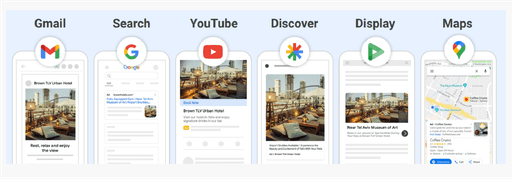
Start with the elephant in the room: Performance Max takes credit for everything.
On the surface it looks great. Underneath, it often goes after your remarketing audiences and brand searches, because those are the easiest conversions to win.
It also competes with your Search campaigns. Per Google's own help page, a Search campaign wins only when the search is identical to an exact match keyword. If it matches a phrase or broad keyword, Search shares priority with Performance Max's search themes, and Ad Rank decides. So Performance Max can take traffic you thought your Search campaigns owned.
When is Performance Max worth it for SaaS? When it's bidding on SQLs or opportunities (MQL at minimum), you're getting at least 20 to 30 of those a month, and you've excluded your brand terms. Give it a demo form fill and you'll fill your CRM with low-quality leads, or bots.
YouTube ads
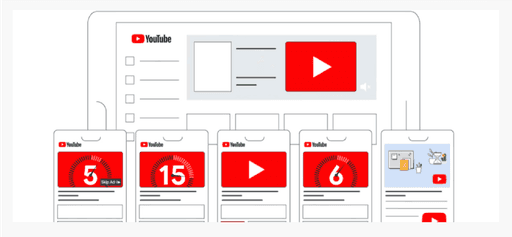
Of everything past Search, YouTube has the most untapped potential and the hardest attribution problem. It won't show the direct return a competitor campaign does. It's an awareness play.
We generally wouldn't recommend it below $50,000 a month in total ad spend, and closer to $100,000 is better. It needs an upfront investment in video and then spend that isn't expected to return directly. For the brands that can carry that, it's one of the best awareness channels there is.
Case study: Oscilar (B2B SaaS)
Oscilar sells risk software to fintechs and banks: credit underwriting, fraud prevention and transaction monitoring. It's a long sales cycle with large contracts, so we judge Google Ads on pipeline in HubSpot, not on form fills.
Chasing lead volume cost them pipeline. In one period the account was pushed toward more top-of-funnel leads (the team called it the "feeder" approach). Compared with the period before, on almost identical spend (about $244,000 in each period), MQLs went up, from 177 to 200. But sales-qualified leads fell from 113 to 31, and opportunities from 20 to 9. More leads, far less pipeline. That's the clearest lesson we have on section 3: aim the account at the conversion closest to revenue, not the one with the most volume.
Competitor campaigns punched above their weight. Campaigns bidding on competitor names were a small slice of the budget. One of them, on GDS Link terms, produced a deal that closed at $105,000 in first-year contract value. Another, on Provenir terms, sourced about $1.38 million in pipeline across three deals.
Brand got cheaper without losing leads. In August 2024 we lowered brand bids. Cost per MQL from brand searches fell 73%, from $598 to $156 compared with the same period in June, while click-through rate dipped 17%.
Case study: Talentfoot (B2B services)
Talentfoot is an executive and sales recruiting firm. Not SaaS, but the same B2B problem: a few high-value deals, tracked in HubSpot, sourced from search.
Broad match, judged on deals. Talentfoot's main non-brand campaign runs largely on one broad match keyword, a setup that came out of a Google Ads experiment in 2024. From June 2025 to October 2026, that keyword drove about $718,000 in signed deals on about $85,000 of spend, measured in HubSpot.
Google's numbers and the CRM disagreed. An ad group paused in early 2026 for a poor cost per conversion in Google Ads had produced a $400,000 deal. Judging keywords on Google's conversion counts would have cut one of the best performers in the account. That's why we judge keywords on CRM deals, over 180 to 365 days, not on in-platform CPA.
Leads qualify fast. About 90% of Talentfoot's opportunities are created within three days of the ad click, so an opportunity conversion reaches Google quickly enough to bid on.
What a B2B Google Ads proposal should include
If you're hiring an agency or a freelancer for B2B Google Ads, a good proposal should cover:
How they'll measure success: which CRM stage (MQL, SQL, opportunity, closed won) and over what window.
Offline conversion tracking: whether it's set up today, and how they'll set it up if not.
Account structure: brand, non-brand by use case, competitor, remarketing, and what they'd consolidate.
Bidding plan: which strategy, pointed at which conversion, and when it changes.
Negative keyword and search term process: how often they review, and how lists are organized.
Budget and testing plan: what gets tested first, and how long a test runs before a call.
Reporting: pipeline and revenue from the CRM, not just clicks and cost per lead.
If a proposal only talks about clicks, impressions and cost per lead, that's the agency telling you what it'll optimize for.
Common questions
Do Google Ads work for B2B SaaS?
Yes, when the account is built around pipeline. Search catches buyers who are already looking for your category or a competitor, which is rare in B2B. The accounts that struggle are usually bidding on form fills with no CRM data flowing back.
How much should a B2B SaaS company spend on Google Ads?
Enough to get each campaign to around 15 to 30 down-funnel conversions a month, which is what automated bidding needs to learn. For most B2B SaaS companies that means starting with brand, competitor and one or two non-brand use cases, and adding campaigns only as they hit that volume.
What conversion should B2B SaaS companies optimize Google Ads for?
The one closest to revenue that still happens often enough: opportunity or SQL if you have the volume, MQL if not. Avoid bidding on raw form fills once you have CRM data.
Should B2B SaaS companies use Performance Max?
Only once it can bid on SQLs or opportunities at 20 to 30 a month, with brand terms excluded. Otherwise it tends to claim brand and remarketing conversions and fill the CRM with low-quality leads.
Is broad match safe for B2B?
With smart bidding, down-funnel conversions, active negatives and a test first, yes. Talentfoot's biggest keyword is broad match.
To wrap things up
To recap:
Structure the account around brand, non-brand by use case and competitor, and keep it simple.
Set up offline conversion tracking before you scale.
Move from manual CPC to Maximize Conversions to Target CPA, pointed at the conversion closest to revenue.
Keep negative keywords in shared, organized lists.
Use broad match once the data and guardrails are in place.
Add Display, Demand Gen, Performance Max and YouTube only after Search is working.
Whether you're at $5,000 or $50,000 a month, these are the foundations that let an account scale. If you want a second set of eyes on yours, we also run Meta ads for B2B and SaaS brands, and our agency vs freelancer guide covers who to hire for which job.
Featured Articles
Our most popular and impactful content

The First Spark newsletter
Written for founders and marketing leads at D2C, CPG and SaaS brands. Unsubscribe any time.