Google Ads for Ecommerce: How to Structure, Bid and Scale
Google Ads for ecommerce works when you judge it on the revenue it adds, not the number in the corner of the dashboard. Most store accounts we audit report a healthy return and still don't grow, because people already searching for the brand carry the average. Split those out, point bidding at your margin, and fix the product feed, and the account starts finding new customers instead of taking credit for old ones.
This guide covers how we structure, bid and scale Google Ads for ecommerce brands, with real account data: an apparel brand's account before we took it over, Zest Dental Solutions, and Copper Moon Coffee.
Last updated November 26, 2026.
Key takeaways
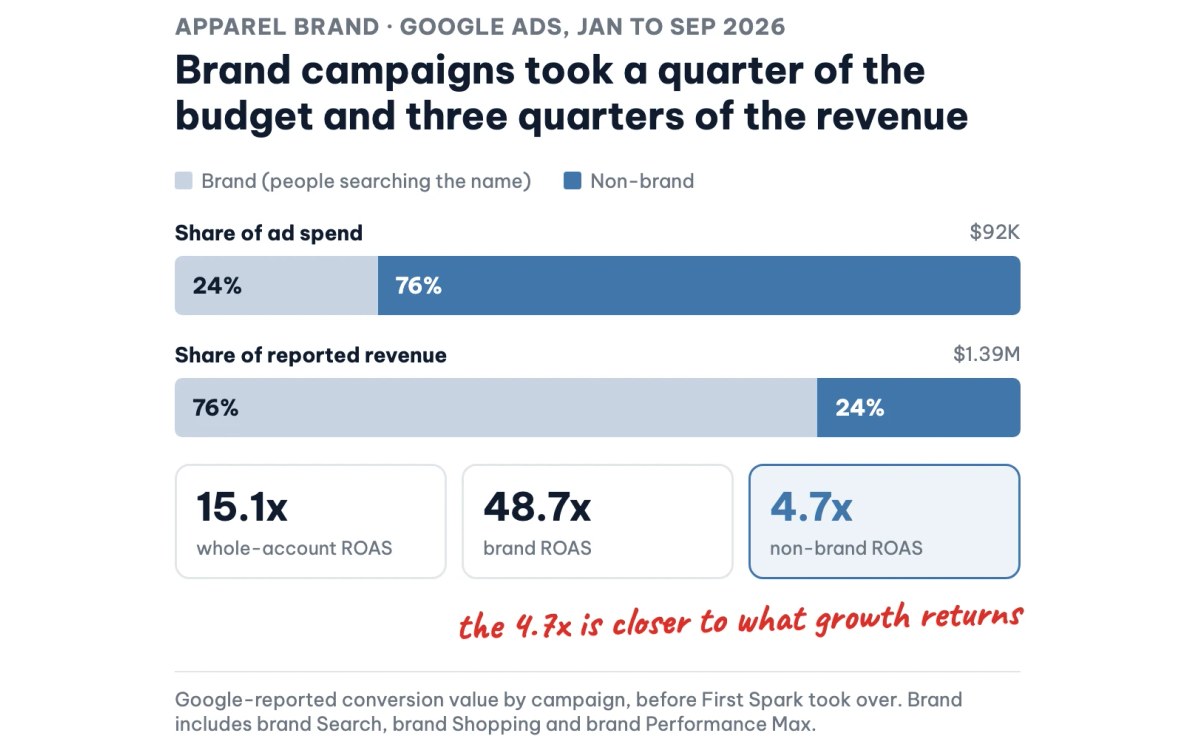
Report brand and non-brand separately. In one apparel account, brand took 24% of spend and 76% of reported revenue.
Five campaigns cover most stores: brand Search, Standard Shopping, Performance Max, non-brand Search and Demand Gen.
Set ROAS targets from your margin. Break-even ROAS is 1 divided by gross margin.
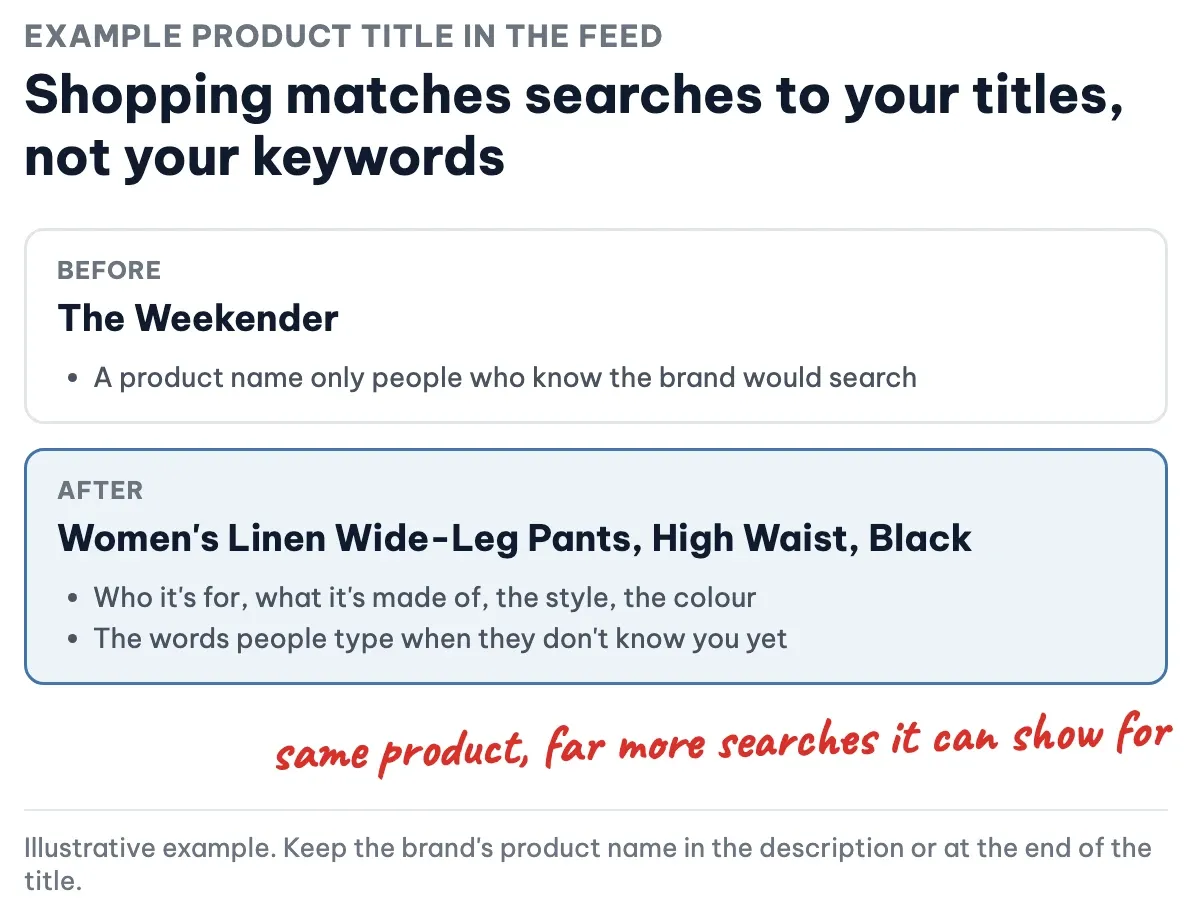
The product feed is your targeting in Shopping and Performance Max. Titles decide which searches you show for.
Judge Performance Max on new-customer revenue, with your brand excluded.
We're skipping the setup basics here (linking Merchant Center, installing the Google tag, location settings). This is about what decides whether an account grows once those are done:
Splitting brand from non-brand.
Which campaigns to run.
Conversion tracking for a store.
Setting ROAS targets from margin.
The product feed.
Performance Max without losing control.
Scaling past search.
Then the case studies, when Google Ads isn't worth it, and the questions we get asked most.
1. Split brand from non-brand before you read any ROAS
This is the single biggest reason ecommerce accounts look better than they are.
When someone types your brand name into Google, they were already coming. Those searches convert at a huge rate and cost very little, so they return 20x, 40x, sometimes more. Mix them into the same campaigns as everything else and the account average looks great while the campaigns meant to find new customers barely break even.
That's what the chart at the top of this page shows: an apparel brand's account from January to September 2026, before we took it over.
The account reported 15.1x. The non-brand campaigns, the ones actually reaching people who didn't know the brand, returned 4.7x. Still profitable, but a very different conversation about how much more to spend.
How to split it:
Run brand terms in their own Search campaign, with a modest budget. Its job is to stop competitors taking your own searches, cheaply.
Add your brand as a negative or brand exclusion everywhere else: non-brand Search, Standard Shopping and Performance Max.
Report the two separately, every time. Growth decisions are made on non-brand only.
Brand still matters. But it measures demand you already created. Non-brand measures whether Google is creating more.
2. Which Google Ads campaigns to run for ecommerce
Google is a data-first platform. Its bidding learns from the conversions each campaign gets, so fewer, better-fed campaigns beat a sprawl of tiny ones. For most stores that means five:
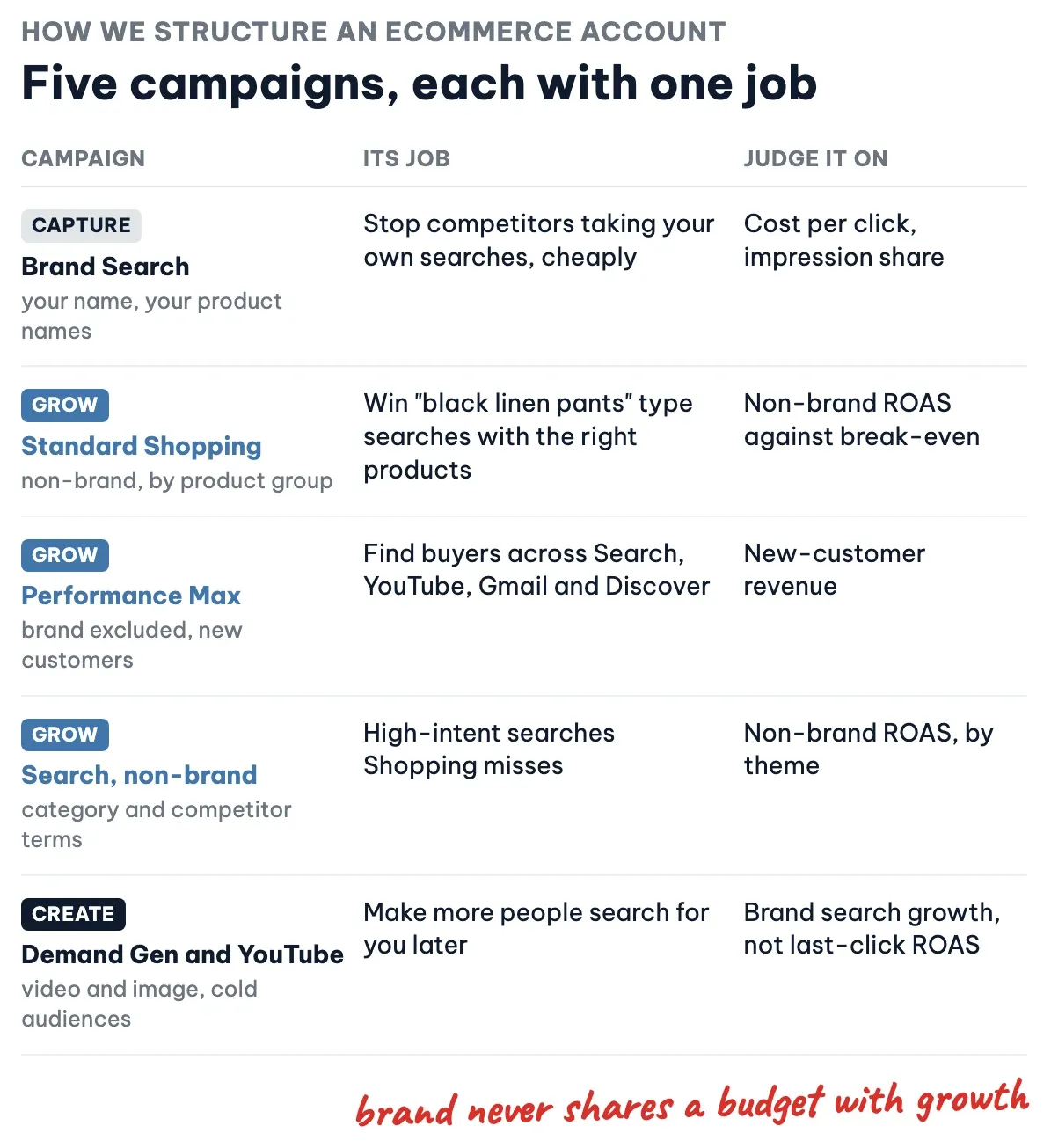
Brand Search. Covered above.
Standard Shopping, non-brand. Product listing ads with the image, price and store name. Split it by product group (category, margin or bestseller) so you can set different targets where the economics differ.
Performance Max, brand excluded. One campaign that runs across Search, Shopping, YouTube, Gmail and Discover. Powerful, but it needs guardrails (section 6).
Non-brand Search. Category searches ("linen wide leg pants") and competitor names, for the high-intent searches Shopping doesn't catch.
Demand Gen and YouTube, once the rest is profitable. These make people search for you later (section 7).
Smaller stores can start with brand Search plus one Shopping or Performance Max campaign, and add the rest as each one earns its budget.
Note: If you're consolidating an existing account, allow at least three weeks for bidding to settle, and change one thing at a time so you can tell what worked.
3. Conversion tracking for an online store
Bidding learns from whatever you count, so count the right thing.
Purchases only, as the primary conversion. Add-to-cart, checkout started and page views can stay in the account as secondary actions, but they shouldn't steer bidding. Count them as primary and Google finds more people who add to cart.
Pass the real order value, so bidding can tell a $40 order from a $400 one.
Count each order once. Duplicate tags (a Shopify app plus a hand-added tag, say) are the most common way a store's ROAS gets inflated.
Turn on enhanced conversions to recover purchases that cookies miss.
Tell Google who your existing customers are. With a customer list uploaded, Performance Max and Shopping can bid more for new customers, or only for them, and report new-customer revenue on its own.
If the numbers in Google Ads don't roughly match your store's sales, fix that before touching anything else.
4. Set ROAS targets from your margin, not a round number
A "good" ROAS depends entirely on how much of each sale you keep. The math is simple:
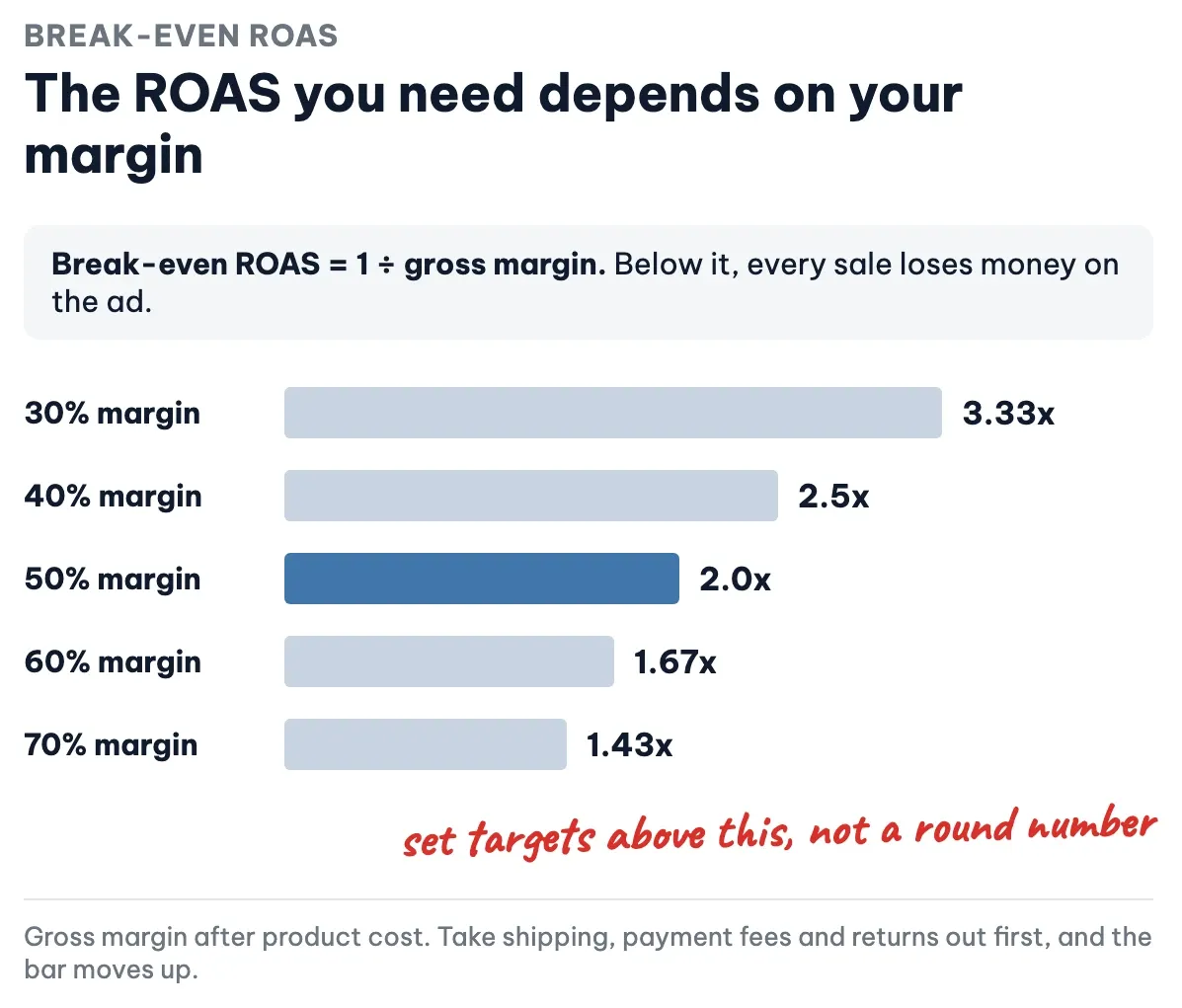
A store with 60% margins makes money on the first order at 2x. A store with 30% margins loses money at 3x. Same ROAS, opposite outcomes. That's why "aim for 4x" is useless advice without knowing the margin.
How we set targets:
Start from break-even, then add what the business needs to cover shipping, fees, returns and profit.
Allow a lower target for new customers if repeat purchases make them worth more over time. That's a call to make with real repeat-purchase data, not hope.
Set different targets by product group when margins differ. A custom label in the feed (section 5) makes that easy.
Bid to profit if you can. Some brands pass gross profit instead of revenue as the conversion value, so bidding chases margin directly.
Then move targets in small steps. A big jump in target ROAS usually just cuts volume.
5. The product feed is your targeting
In Shopping and Performance Max you don't pick keywords. Google matches searches to your product feed, mostly the title. A vague title can only show for vague searches.
What we fix first in a feed:
Titles: who it's for, what it is, the key attribute (material, size, flavour), colour. The words people type before they know you.
Images: a clean main product image. Lifestyle shots can go in the extra images.
Attributes: product category, GTIN, brand, size and colour filled in properly, so the product qualifies for more searches.
Custom labels: margin band, bestseller and seasonal tags, so campaigns can be split and bid by what each product is worth.
Disapprovals: check Merchant Center weekly. A disapproved bestseller is lost revenue nobody notices.
6. Performance Max without losing control
Performance Max works for ecommerce. Left alone, it also drifts toward the easiest conversions in the account: your brand searches and people already on their way to checkout. Then it reports a great ROAS for sales you'd have had anyway.
The guardrails we use:
Brand exclusions on, so Performance Max can't quietly bid on your name.
New-customer acquisition turned on, with your customer list uploaded, so it bids more for people who haven't bought.
Campaign-level negative keywords for irrelevant searches you find in its search terms.
The channel performance and search term reports, checked every week, to see where the money goes.
A clean feed and real creative. Performance Max can only be as good as the products and assets it's given.
Then judge it on new-customer revenue and non-brand ROAS, not its headline number.
7. Scaling past search
Search and Shopping capture demand that already exists. At some point, you've captured most of it, and spending more just buys the same customers at higher prices.
That's when Demand Gen and YouTube earn a budget. They reach people who aren't searching yet. Judged on last-click ROAS they look weak, so we judge them on whether brand searches and non-brand Shopping grow in the weeks after they run.
This is also where Google stops being a standalone channel. For most of the ecommerce brands we work with, Meta creates more of the demand and Google captures it. The two should be planned together, with the same creative ideas running across both. More on that on our Meta ads agency page.
Case study: an apparel brand's account before we took over
The chart at the top of this guide is this account, before we took it over in October 2026. Brand campaigns took $22K of the $92K spent from January to September and were credited with $1.06M of the $1.39M in revenue. Non-brand Search, Shopping and Performance Max spent $70K and returned $330K, 4.7x.
We took over in October 2026, so it's too early to show an after. We'll add the results here once there's a full quarter to read, judged on non-brand revenue.
Case study: Zest Dental Solutions
Zest sells dental implant parts and equipment online to dental practices. It's ecommerce, just with a professional buyer. We've run their Google Ads since 2024.
Comparing the same eight months, January to August, in 2024 and 2026:
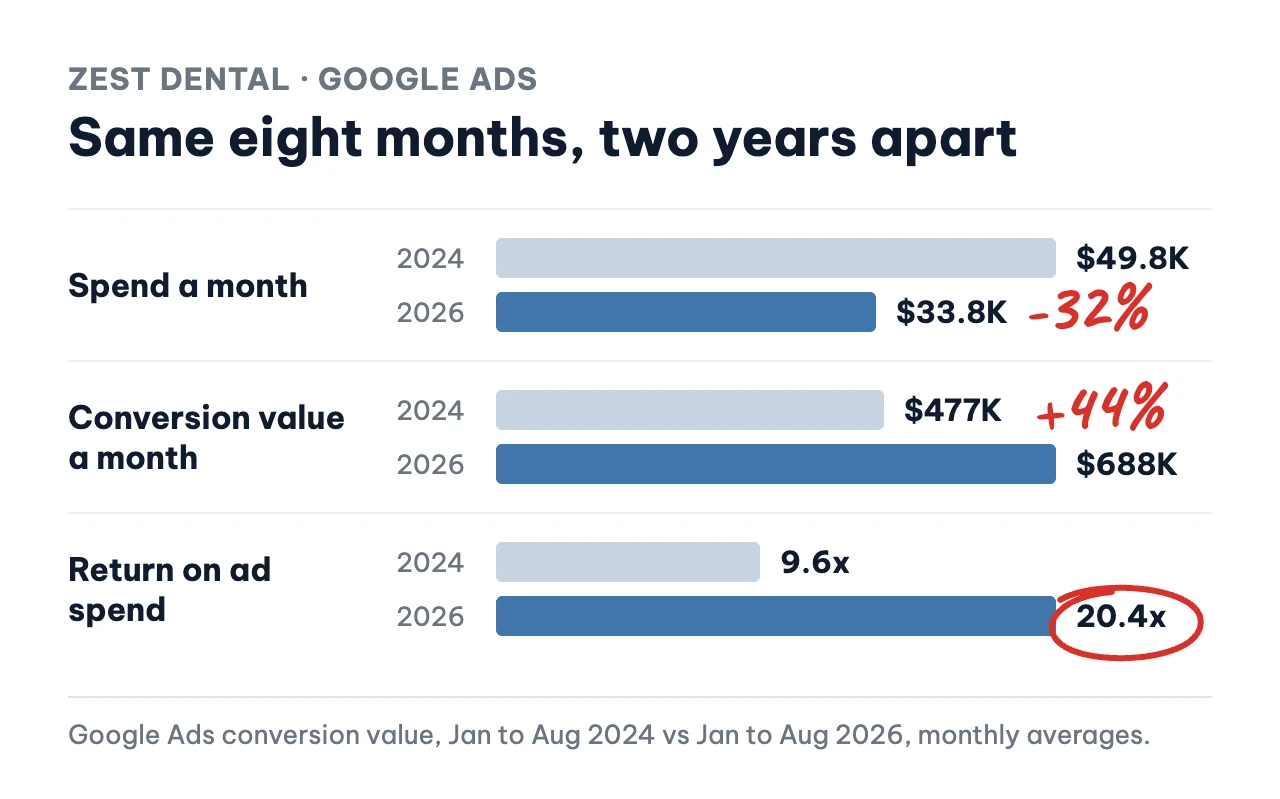
Monthly spend fell 32%, from $49.8K to $33.8K.
Monthly conversion value rose 44%, from $477K to $688K.
ROAS went from 9.6x to 20.4x.
These are Google-reported numbers. Most of the spend now runs through two Performance Max campaigns built on the full product feed, with brand Search kept separate. Dan Stepchew, Zest's Director of Digital Marketing, put the brief simply: "Drive more revenue without increasing cost per conversion."
Case study: Copper Moon Coffee
Copper Moon roasts and sells coffee online and in stores. Consolidating their account structure across Meta and Google cut total acquisition cost by 23% in the first 30 days. The full story is in the Copper Moon case study.
When Google Ads isn't worth it for a store
Google only captures demand that exists. It's a poor fit when:
Nobody searches for what you sell yet. A new product category with no search volume needs demand created first, usually on Meta or TikTok.
Margins are too thin. At 20% gross margin you need 5x just to break even on the first order, which few non-brand campaigns reach.
The budget can't feed the bidding. A campaign getting a handful of sales a month never gives Google enough data to learn. Fewer campaigns with more data each beats spreading thin.
Common questions
Are Google Ads worth it for ecommerce?
Yes, for stores selling things people already search for, with margins that clear break-even. Judge it on non-brand results. If the account only looks profitable because of brand searches, it isn't growing the business.
What's the difference between Shopping and Performance Max?
Standard Shopping shows only product listing ads, and you control bids by product group. Performance Max runs Shopping plus Search, YouTube, Gmail and Discover from one campaign, with less control and more automation. Most stores do well running both, with brand excluded from each.
What is a good ROAS for Google Ads in ecommerce?
One above your break-even, which is 1 divided by your gross margin. At 50% margin that's 2x. Judge non-brand ROAS against it, because brand searches inflate the account average.
Should I bid on my own brand name?
Usually, yes, in its own small campaign. It's cheap, and it stops competitors and resellers taking those searches. Just don't count it as growth.
How much should an ecommerce store spend on Google Ads?
Enough for each campaign to get a few dozen sales a month, so bidding can learn. For a small store that might be one brand campaign and one Shopping or Performance Max campaign. Add campaigns as each one proves it clears your target.
Do I need an agency for Google Ads?
Not to start. A store with a small catalog can run brand Search and one Shopping campaign itself. An agency earns its fee once spend is high enough that the feed, targets and structure decide whether you make money. We take on brands spending around $20,000 a month or more.
To wrap things up
To recap:
Split brand from non-brand, and make growth decisions on non-brand only.
Run five campaigns at most, each with one job.
Count purchases once, with real values, and tell Google who your customers are.
Set ROAS targets from margin.
Treat the feed as your targeting.
Give Performance Max guardrails and judge it on new customers.
Add YouTube and Demand Gen once search is profitable, and plan them with Meta.
If you want a second set of eyes on your account, see how we work as a Google Ads agency. Selling B2B instead? Our guide to Google Ads for B2B SaaS covers lead-gen accounts, and you can read what clients say on our reviews page.
Featured Articles
Our most popular and impactful content

The First Spark newsletter
Written for founders and marketing leads at D2C, CPG and SaaS brands. Unsubscribe any time.